
Streamline Your Browser with Kip
Overview
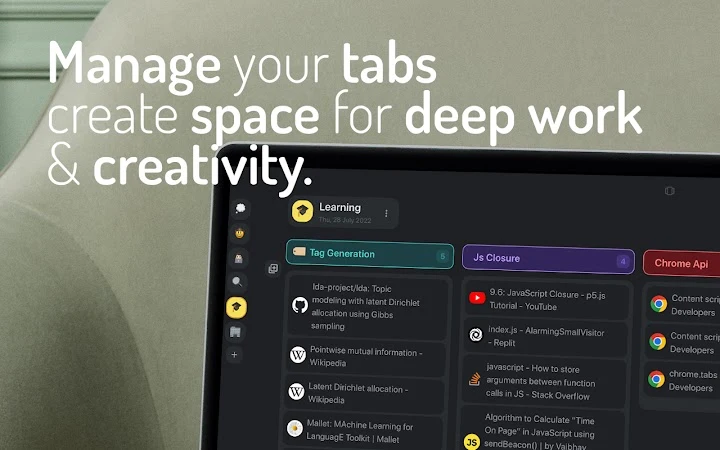
Kip is a desktop-focused browser utility designed to enhance productivity by simplifying tab management. The software enables users to organize their browser tabs into customizable spaces and boards, reducing digital clutter and minimizing distractions. By replacing the default new tab page, Kip offers a streamlined interface that supports continuous workflow and focused work sessions. It is tailored for professionals and individuals who rely heavily on web-based tasks, including entrepreneurs, designers, researchers, and students. The application emphasizes maintaining user flow by providing quick access to frequently used resources and structured task environments. All data remains stored locally within the browser, ensuring privacy and no external data transmission. This makes Kip suitable for users concerned about data security and those seeking a distraction-free digital workspace. The software operates directly within the browser environment, integrating seamlessly with daily workflows without requiring complex setup or additional software installations.
Key Features & Capabilities
- Tab Organization via Spaces and Boards – Users can group related tabs into distinct spaces and boards, enabling structured management of projects, research topics, or daily tasks. This feature supports efficient navigation between different work contexts without opening multiple browser windows.
- Default New Tab Replacement – Kip replaces the standard new tab page with a clean, intuitive interface that promotes focus and quick access to saved resources, reducing time spent searching for open tabs.
- Local Data Storage – All user data, including tab collections and board configurations, is stored exclusively on the local device. No information is sent to external servers, ensuring full privacy and compliance with data protection standards.
- Intuitive and Fast Workflow – The interface is designed for rapid interaction, allowing users to create, switch, and manage boards with minimal clicks. This supports seamless transitions between tasks, enhancing overall work efficiency.
- Accessibility Across Devices – While the software operates within the browser, its functionality remains consistent across supported platforms, offering a uniform experience for users on Windows and Mac systems.
These capabilities are especially useful in real-world scenarios such as managing research materials for academic projects, organizing client work across multiple campaigns, or maintaining focus during deep work sessions. The tool is ideal for users who frequently open dozens of tabs and struggle with maintaining order.
User Interface, Workflow & Performance
The user interface of Kip is minimalistic and designed around clarity and speed. Navigation is straightforward, with a central dashboard that displays available spaces and boards. Users can create new boards with a single click and assign relevant tabs through drag-and-drop or quick-add functions. The layout prioritizes readability and responsiveness, ensuring smooth interactions even when managing large numbers of tabs. The workflow is optimized for efficiency, allowing users to switch between contexts in seconds without disrupting their focus.
Performance details were not specified by the developer. However, based on general software behavior patterns, the application is expected to operate with low latency and minimal impact on system resources. The developer did not specify resource usage details, and no performance benchmarks were provided. Stability is assumed to be consistent with typical browser-based tools, though actual behavior may vary depending on the user’s system configuration and browser environment.
Compatibility & System Requirements
Kip is compatible with both Windows and Mac operating systems, supporting a wide range of desktop environments. The software has a file size of 2.1 MB, indicating a lightweight installation that should not significantly affect system storage. The version is listed as 1.0.0, suggesting an initial stable release. Exact system requirements were not listed, and no hardware specifications were provided. Compatibility information was partially provided, with support confirmed only for the mentioned platforms. The developer did not specify minimum CPU, RAM, or browser version requirements.
Pros and Cons
Pros
- Efficient tab organization using spaces and boards
- Replaces default new tab page with a focused interface
- Local-only data storage ensures privacy
- Lightweight at 2.1 MB
- Intuitive design suitable for non-technical users
Cons
- No public information on system requirements or hardware needs
- Performance behavior not detailed by developer
- Only available as a browser-based tool, no standalone desktop app
- Limited customization options not specified
- Updates and version history not publicly documented
FAQ Section
Is Kip compatible with my operating system?
Kip supports both Windows and Mac systems. Users on these platforms can install and use the software without compatibility issues.
Does Kip store my data online?
No. All user data, including saved tabs and board configurations, is stored exclusively on the local device. The software does not transmit any information to external servers.
Can I use Kip without an internet connection?
Yes. Since Kip operates within the browser and stores data locally, it functions fully offline after initial setup. No internet connection is required for day-to-day use.
How often does Kip receive updates?
The update frequency is not publicly disclosed. Users are advised to check the official source for the latest version and new features.
What type of license does Kip use?
Kip is available as free software. No licensing fees are required for use, and the current version is provided at no cost to users.
Final Thoughts + CTA
Kip delivers a focused, privacy-first solution for managing browser tabs, making it a valuable tool for anyone overwhelmed by digital clutter. Its ability to replace the default new tab page with a structured, customizable interface significantly improves workflow efficiency. The emphasis on local data storage adds a strong layer of trust and security, especially for users handling sensitive information. While detailed system requirements and performance metrics are not available, the lightweight footprint and intuitive design suggest broad usability across standard desktop environments. The software is particularly well-suited for students, researchers, creatives, and entrepreneurs who rely on multiple browser tabs daily. For those seeking a simple yet powerful way to maintain focus and organization, Kip offers a compelling, no-cost option. Download Kip now.







